Knowledge Tree: Difference between revisions
| Line 48: | Line 48: | ||
** Document and folder creation and management | ** Document and folder creation and management | ||
** WYSIWYG editor for documents/folder descriptions | ** WYSIWYG editor for documents/folder descriptions | ||
** Adding resources from RSS feeds - simplifies adding of large amounts of resources by reducing the entry to selecting from a combo-box ([[Knowledge Tree#Screenshots|below]]) | ** Adding resources from RSS feeds - simplifies adding of large amounts of resources by reducing the entry to selecting from a combo-box ([[Knowledge Tree#Screenshots|below]]) | ||
** Configuration of access control (view | ** Configuration of access control - (groups of) users can be given view/add/edit rights for a set of typed nodes in the sub-tree of the folder or the whole portal | ||
** (Conditional) hiding of folders and documents | ** (Conditional) hiding of folders and documents | ||
* Adaptation | * Adaptation | ||
** Tacking user navigation via [[CUMULATE]] | ** Tacking user navigation via [[CUMULATE]] | ||
** (Conditional) adaptive navigation support via [[PERSEUS]] | ** (Conditional) adaptive navigation support via [[PERSEUS]] - adaptive navigation can be turned on in folders for all users or only selected groups of users | ||
* Social/Community | * Social/Community | ||
** Note-taking | ** Note-taking ([[Writing Notes|below]]) | ||
** Ratings (under development) | ** Ratings (under development) | ||
Revision as of 19:06, 17 February 2009
Overview

Knowledge Tree is a link aggregating portal. It presents content structured according to the folder-document paradigm. Knowledge Tree provides authentication and authorization and implements a simplified form of access control. It supports collaborative authoring and social annotation. Knowledge Tree is primarily oriented towards ADAPT2 architecture.
Try Knowledge Tree by creating a trial account. Contact us to get "showcase" access to full courses in C/Java/SQL.
Usage
Knowledge Tree has been intensively used as learning portal in the following courses
† this particular tool might be included or excluded based on specific offering of the course and/or goals of the study
Features
- Authoring
- Document and folder creation and management
- WYSIWYG editor for documents/folder descriptions
- Adding resources from RSS feeds - simplifies adding of large amounts of resources by reducing the entry to selecting from a combo-box (below)
- Configuration of access control - (groups of) users can be given view/add/edit rights for a set of typed nodes in the sub-tree of the folder or the whole portal
- (Conditional) hiding of folders and documents
- Adaptation
- Social/Community
- Note-taking (below)
- Ratings (under development)
Screenshots
-
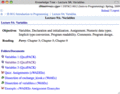 Knowledge Tree
 -
 Knowledge Tree. Editing folder description
 -
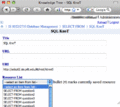 Knowledge Tree. Adding resources from RSS feed
 -
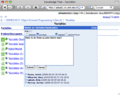 Knowledge Tree. Editing notes


Standardization
Knowledge Tree structure is partially serialized as RDF. For more information refer to Knowledge Tree RDF Binding.